No, tipping has no effect on any part of the delivery process – it is only a way to show your shopper some appreciation.

No, tipping has no effect on any part of the delivery process – it is only a way to show your shopper some appreciation.
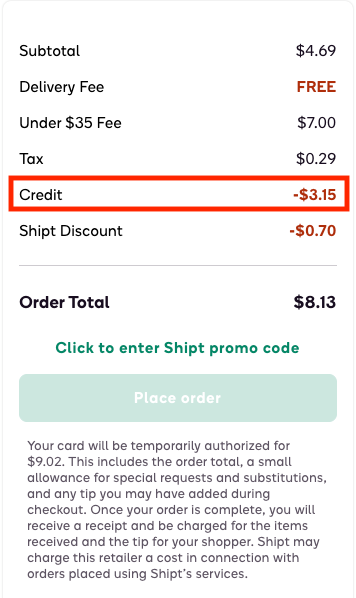
A Shipt credit is an in-app balance that will automatically be deducted from the next order you place with Shipt.* You will see this at checkout as Credit in the breakdown of charges for your order.
*Due to legal restrictions, Shipt credits cannot be applied toward the purchase of alcohol.
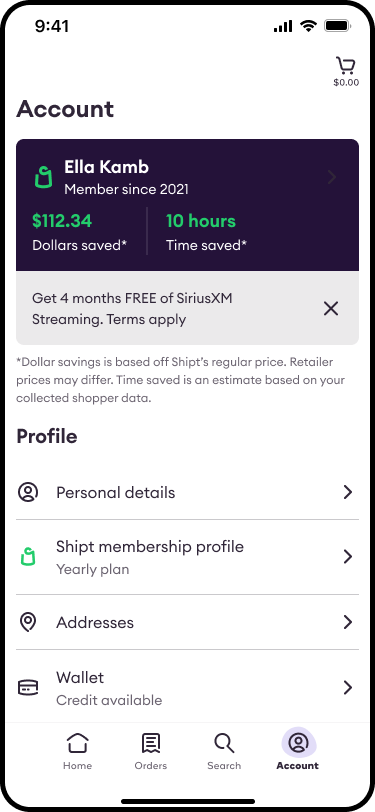
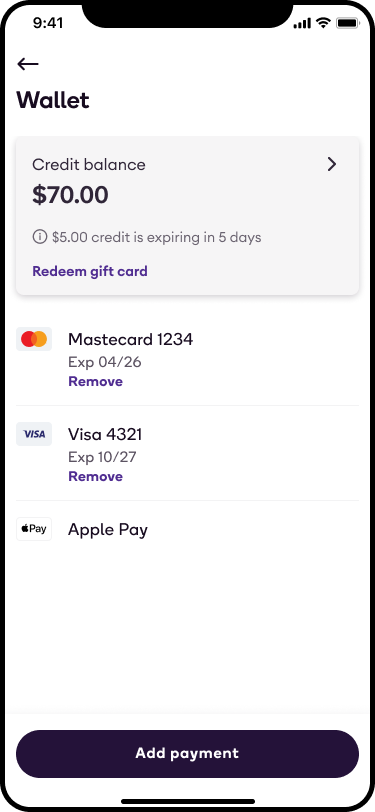
You can also review your current balance at any time by navigating to your Account page and tapping Wallet.
Shipt credits are automatically applied to your next order. At checkout, you’ll see your credits appear in green in the breakdown of charges as Shipt Credit Applied.
Please note that Shipt credits cannot be applied to delivery fees or converted to Shipt Passes. While Shipt credits can be applied to orders containing alcohol, they cannot be applied to alcohol items.*
*Note: You must be 21+ and have a valid ID to order and/or receive alcohol.
Digital coupons may be offered through all retailers on Shipt, which you can apply to your order with just one click. They are exclusive e-commerce savings that may not reflect in-store deals, and vice versa.
A red box with dotted lines will display the coupon amount if an item is eligible for a coupon. This box will show in the cart as well.


Once the coupon is clipped, you will select Add to cart on the coupon pop-up. When a coupon's requirements are completely satisfied, it will show "-$__ applied at checkout."
Example: "-$4.00 applied at checkout"

There will also be a "Coupons" line on the Checkout screen. Your delivery fee will be calculated before coupons are applied, so the full price of items will count toward the $35 free delivery minimum.
