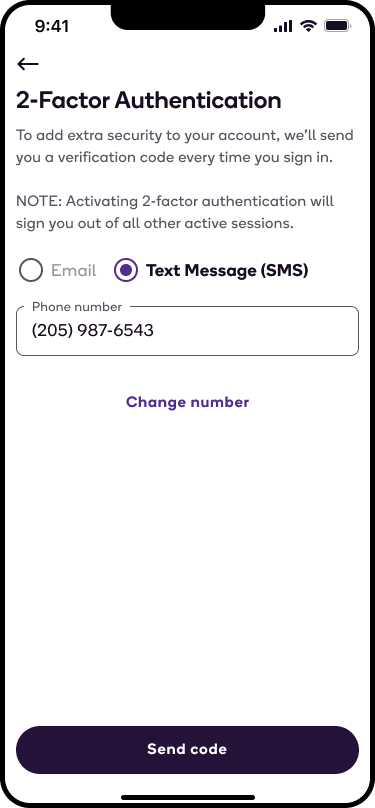
You can add enhanced security to your account by enabling 2-Factor Authentication. This requires a unique code to be sent to your email or SMS every time you log into your account.
To enable 2-Factor Authentication:
- Navigate to your account page and select 2-Factor Authentication.
- Select the method you would like to receive your verification code, and select Send code.
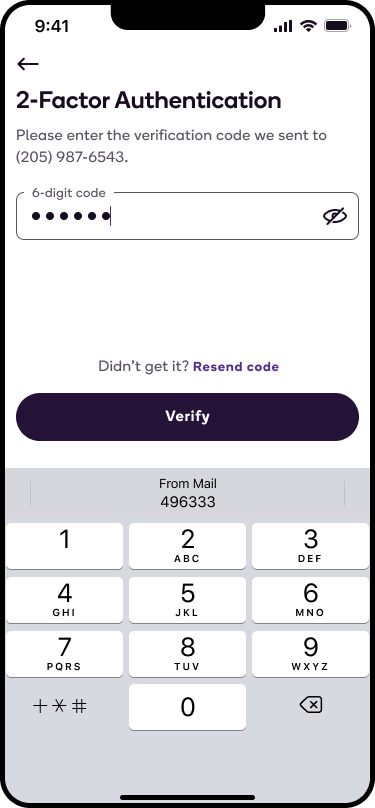
- Enter your unique authentication code, and select Verify.
- Once you have enabled 2-Factor Authentication, you will receive a new unique code to your email or SMS every time you log into your account.
Please note that if you haven't used your Shipt account in over a year, we will automatically apply 2-Factor Authentication to your account in order to help protect your information. If you ever want to disable 2-Factor Authentication, you can do so by following the same steps above and selecting Turn Off.